Drawables
A drawable is one .ydd model with its texture variants. The project view lists them per addon on the left and shows the selected one on the right.
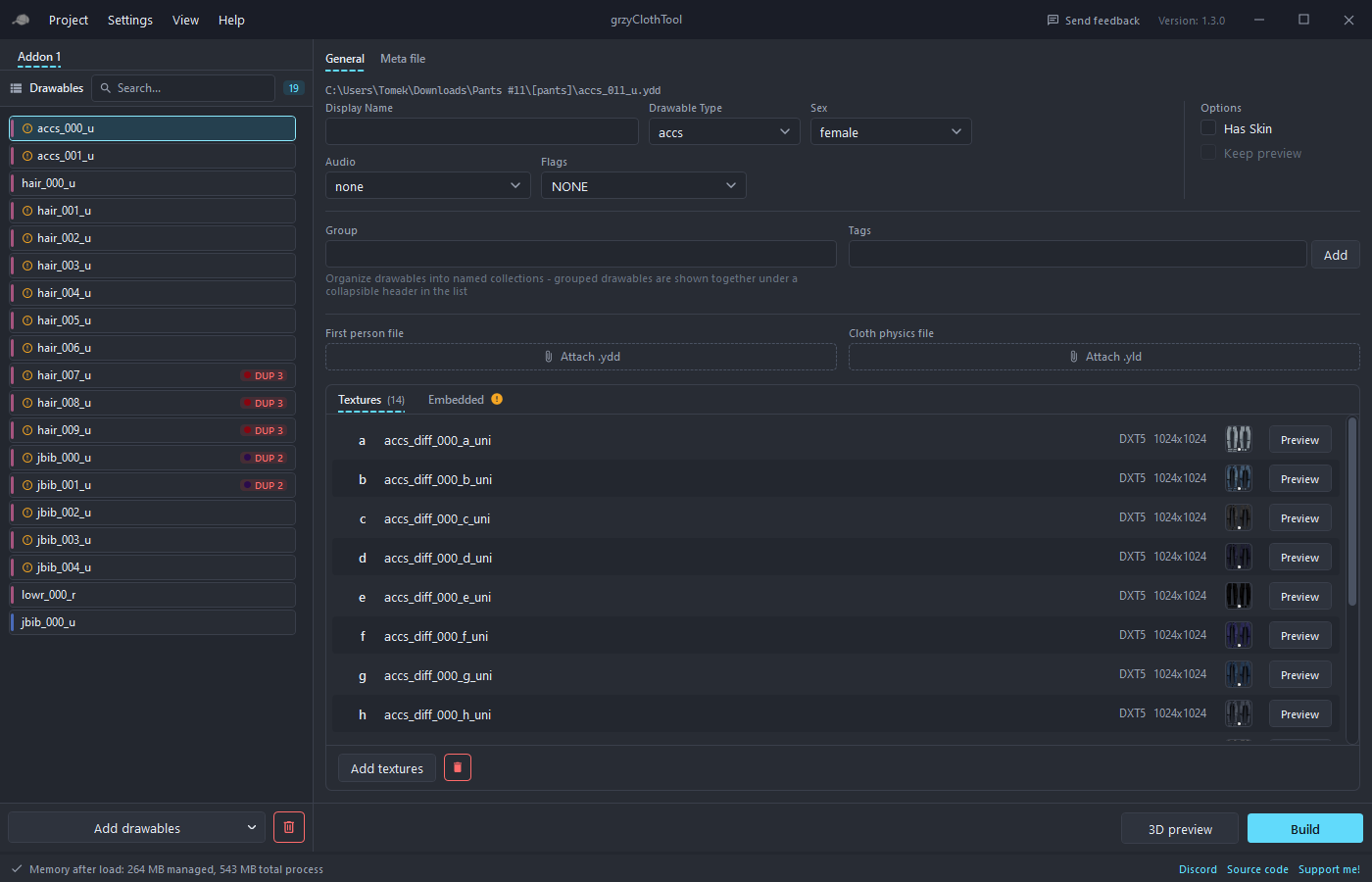
Adding drawables
The Add drawables button picks files and reads the gender and type from the file names, for example mp_f_freemode_01^jbib_003_u.ydd. Its dropdown offers the other ways in:
- Select Folder (auto) searches a folder and its subfolders for
.yddfiles. - Select Files as Female / Male and Select Folder as Female / Male force the gender when the names don't carry it.
Files can also be dragged from Explorer onto the list, including files inside archives.
When a name can't be resolved, the Resolve drawable import window asks for the gender and the drawable type before continuing.
Duplicates on import
Every drawable gets a fingerprint from its file size, type, gender, polygon counts per LOD and texture count. When an added file matches one already in the project, the Duplicate Drawables Detected dialog lists the matches and lets you pick which ones to add anyway. See Asset Browser and duplicates for handling duplicates later.
The list
- Search matches the name, display name, type, number, gender, group and tags.
- Grouping follows the Settings option: a flat list, sections per type, sections per custom group, or groups with types inside. Section headers collapse and show counts.
- Reordering by drag and drop works within the same type and gender. Dropping a drawable on a group header moves it into that group.
- Double-click opens the drawable in the 3D preview.
Badges
| Badge | Meaning |
|---|---|
| Blue or pink bar | Male or female |
RSV | Reserved slot, keeps the numbering without a model |
NEW | Added since the project was opened, when "Mark new drawables" is on |
ENHANCED / LEGACY | File format, shown only when the project mixes both. Either format builds for either game edition, see Build |
PREVIEW | Kept in the 3D preview while other drawables are selected |
DUP 1, DUP 2 ... | Member of a duplicate group, colour-coded per group |
| Lock icon | Encrypted file, cannot be previewed |
| Warning icon | A texture or polygon warning, hover for the reason |
Tags appear as chips after the name.
Right-click menu
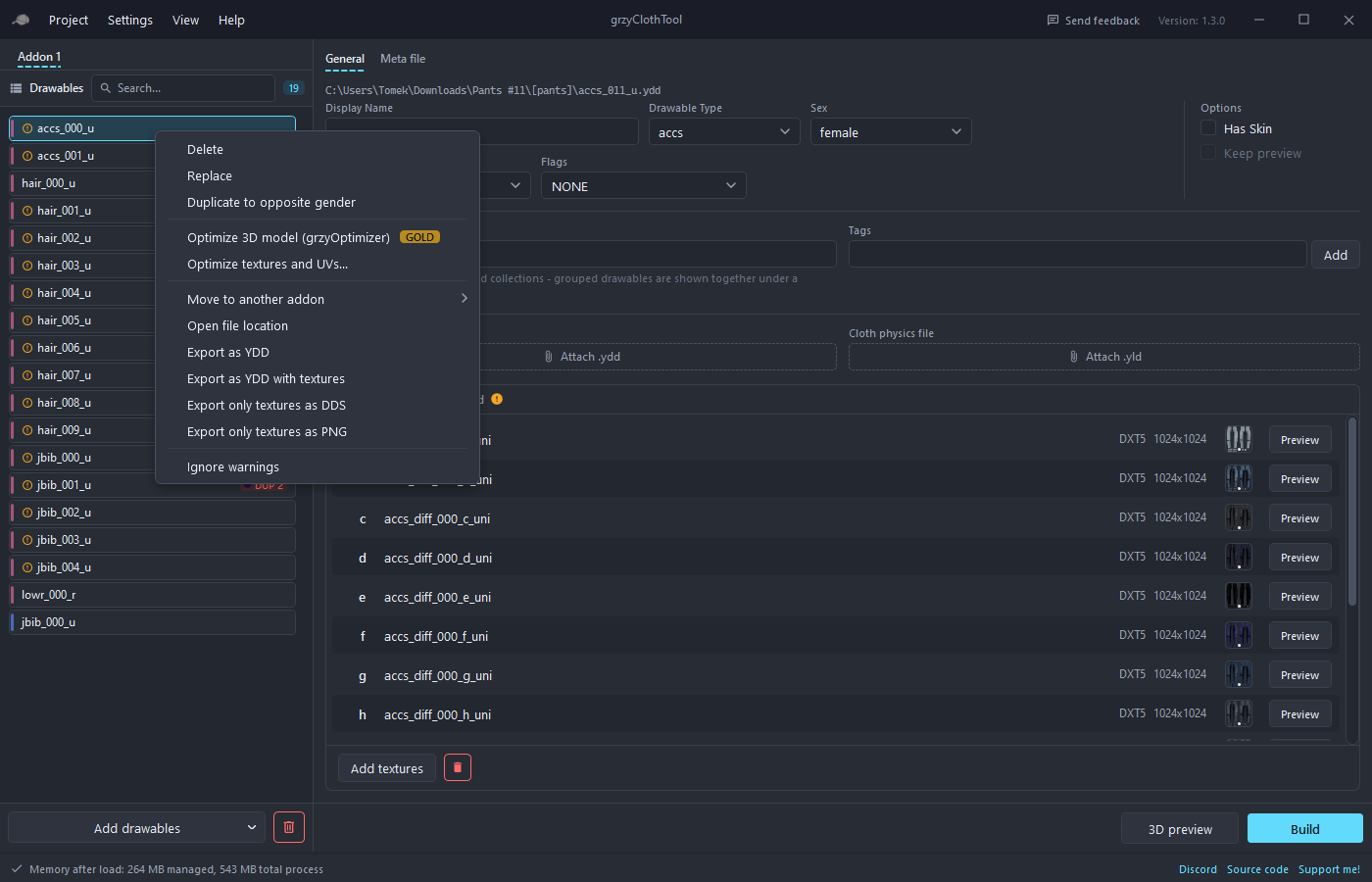
- Delete asks whether to delete or to replace with a reserved slot. Deleting shifts the numbers of everything after it, a reserved slot keeps them.
- Replace swaps the model file and keeps every setting.
- Duplicate to opposite gender copies the drawable with its textures, audio, heels, hair scale, flags, first person and cloth physics files.
- Optimize 3D model (grzyOptimizer) reduces the polygon count, see Account and supporters.
- Optimize textures and UVs... opens the optimize window. Revert optimization appears when backups from an earlier "Apply now" exist.
- Move to another addon moves the drawable between the addons of the project.
- Open file location, Export as YDD, Export as YDD with textures, Export only textures as DDS and Export only textures as PNG get files out again.
- Ignore warnings hides the warning badge for this drawable.
- Ignore duplicates hides the duplicate badge for this drawable.
With several drawables selected the menu offers delete, move, the export entries and Optimize textures and UVs... for the whole selection.
Keyboard shortcuts
| Key | Action |
|---|---|
Ctrl+S | Save the project |
Delete | Delete the selection, with the delete or replace prompt |
Shift+Delete | Delete immediately, no prompt |
Ctrl+Delete | Replace the selection with reserved slots immediately |
Ctrl+Z | Undo the last change to the project |
Ctrl+Y | Redo |
Undo
Every change to the project can be undone with Ctrl+Z or Project > Undo, and redone with Ctrl+Y or Project > Redo. The menu entries name the step, for example "Undo delete jbib_003_u" or "Undo optimize hair_002_u". That covers adding, deleting, replacing and moving drawables, edits to their properties, textures, tags and groups. Files removed from disk by "Delete drawable files automatically" are moved to a trash folder inside the project and come back on undo; the trash is emptied when the project is opened next time. The last 40 steps are kept while the project is open.
Addons and the 255 limit
The game allows 255 drawables of one type per addon. The project holds any number of addons as tabs, and when a type is full the tool starts a new addon automatically. The limit per addon is configurable in Settings, for older resources that still expect 128.